Guardrails Without Changing Your Agent Code: ALICE WonderFence Is Now a Databricks Unity AI Gateway External Policy

TL;DR
Databricks named ALICE a launch partner for Unity AI Gateway, and ALICE WonderFence is now available there as an External Policy. Instead of wiring guardrails into each agent’s code, you attach one policy to a model in Unity Catalog, and every call through it is screened in real time, prompts in, responses out, with no SDK and no code changes.
Enforce ALICE's real-time safety and security guardrails on any governed model in Databricks. Configure it once in Unity Catalog, with zero changes to your application code.
In June 2025, we showed how to put ALICE WonderFence guardrails around a Databricks Mosaic AI agent by wrapping its interaction loop with the ALICE SDK. It worked, and it still does. But every new agent needed the same wiring, and every team had to remember to add it.
This June, at Data + AI Summit 2026, Databricks named ALICE a launch partner for Unity AI Gateway, and we explained why guardrails belong at the platform level rather than inside each agent. This post shows what that looks like in practice.
ALICE WonderFence is now available as an External Policy in Databricks Unity AI Gateway. You connect the gateway to ALICE once, attach a policy to a model in Unity Catalog, and every governed call from every agent is screened in real time: prompts on the way in, responses on the way out. There's no SDK in your application and no change to agent code. It's the simplest way we have shipped to put ALICE guardrails on Databricks.
Set the guardrail once in the gateway, and every agent is covered.
Why the gateway is the right place for a guardrail
Guardrails written into application code have a structural weakness: they are only as good as their coverage. One team wires them in, another forgets, a third copies an old template. The policy you think is everywhere is actually wherever someone remembered to put it.
Moving enforcement to the gateway reverses that. The Unity AI Gateway already sits inline on every governed model call. A safety decision made there applies to all traffic through that model (every agent, every app, every caller) because none of them can route around it. Security teams get one place to attach a policy and one place to see it working. Application teams get guardrails without building an integration.
How it works
The Unity AI Gateway calls ALICE up to twice per governed request, once for each phase you enable: before the model runs (model_call) and after it responds (model_result). Each time, ALICE inspects the content and returns a verdict: ALLOW or DENY. The gateway enforces that verdict inline. On DENY, it blocks the call and shows ALICE's reason to the end user. On ALLOW, the call proceeds.
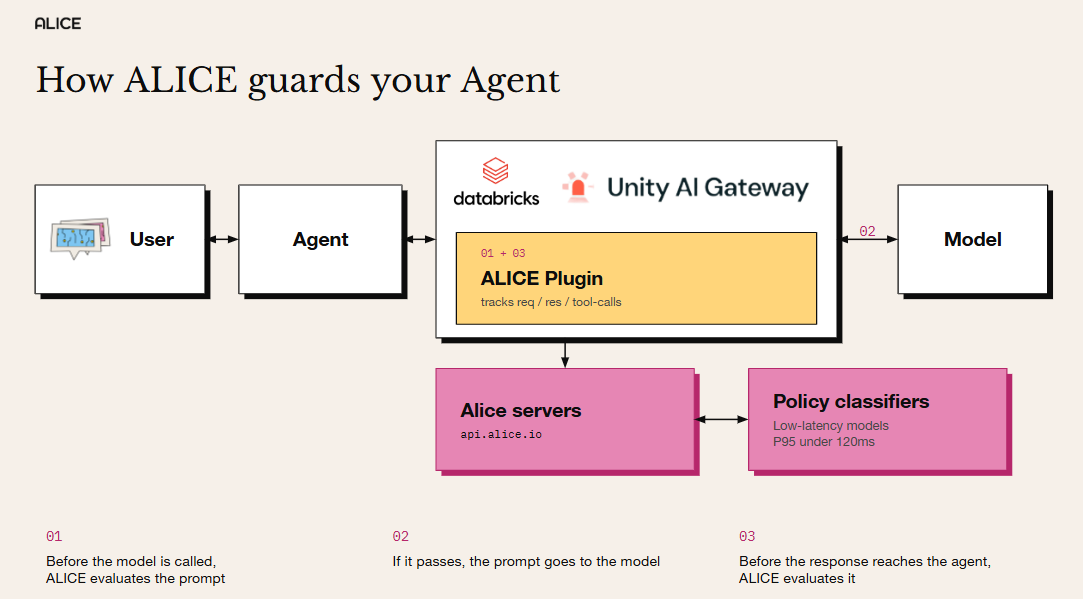
You choose which phases run: input only, output only, or both. With both phases on, the gateway calls ALICE twice per request.
ALICE runs the policies you have already defined for your application in the ALICE platform: the same prompt injection, PII, safety, and custom deny-topic detections you use everywhere else. The attached policy tells ALICE which application's policies to run, so each model is governed by exactly the policy set it needs.
Policies built for your enterprise, custom by design
What makes ALICE worth bringing to the gateway is what it enforces. Every enterprise draws its safety and compliance lines in a different place: what one company must block, another depends on. ALICE WonderFence does not ship a fixed model and ask you to accept it as is. You bring your own policies, and ALICE builds dedicated classifiers around those exact definitions.
Those classifiers are fast. ALICE runs custom policy detections in under 120ms p95, so enforcing them inline on every model call (twice, when both phases are on) stays within the gateway's latency budget instead of slowing your application down.
Because policies are chosen per application, your apps don't have to share one lowest-common-denominator ruleset. A customer-support assistant and an internal coding agent can allow and block entirely different things. You attach each app's app_id, and only the policies assigned to that app run.
Setting it up
Setup takes four steps, and that brevity is the point.
Step 1: Set up OAuth access in ALICE WonderFence
ALICE authenticates Databricks with an OAuth 2.0 client-credentials grant, so start by creating OAuth credentials (a client ID and a client secret) in ALICE. Follow the OAuth credentials guide in the ALICE docs. You will use these credentials in the connection you create next.
Step 2: Create a Unity Catalog HTTP connection to ALICE
The connection stores ALICE's endpoint and your credentials:
- Host:
https://api.alice.io - API path:
/v2/evaluate/databricks - Auth type: OAuth M2M (client credentials)
- Token endpoint:
https://api.alice.io/v1/oauth/token - Client ID and client secret: the OAuth credentials you created in step 1
Databricks exchanges these credentials for a bearer token at ALICE's token endpoint and presents the token on every call.
Step 3: Attach an External policy to your model
In the model's policy configuration, set the guardrail type to External, choose the connection from step 2, and select the phases to run: input (pre_call), output (post_call), or both. In the Policy configuration field, tell ALICE which application's policies to run:
{ "app_id": "<your-application-id>" }
The app_id comes from your ALICE Application Inventory. Only the policies assigned to that application apply.
Step 4: Start in Log mode, then switch to Enforce
Databricks lets you attach the policy in Log (dry-run) mode first: real traffic flows, ALICE's verdicts are recorded, and nothing is blocked. Review what would have been blocked, confirm it matches your intent, then switch to Enforce. Allow 60–90 seconds for a newly attached policy to take effect before you test it.
What a block looks like
When ALICE denies a call, it returns a decision and a human-readable reason:
{ "result": "DENY", "reason": "Message violates policy: PII, Prompt Injection" }
Databricks blocks the request and shows the user ALICE's reason. An allowed call returns { "result": "ALLOW" } and proceeds untouched. Every response comes back as HTTP 200, with the verdict in the body.
Scope and capabilities of this release
We would rather be precise than oversell. In this release:
- It is decision-only. ALICE returns ALLOW or DENY. Databricks external policies enforce a decision; they do not rewrite or redact content. If a policy would normally mask a value (for example, redacting PII in place), the redaction is not applied here: the call is allowed and the detection is recorded. Masking remains available through ALICE's SDK and other integrations that can transform content.
- It screens model requests and responses, not tool-call events. Unity AI Gateway does not yet support screening tool calls through external policies.
- It is fail-closed by design. Databricks treats a missing, malformed, or unavailable verdict as a block. Because enforcement sits on the critical path, latency matters, and ALICE responds within the gateway's response budget.
Your custom policies, on every model call
Putting guardrails in the gateway means unsafe prompts and responses are blocked in real time, and every decision is logged with the reason, without asking a single application team to change a line of code.
The rules being enforced are also your own. General-purpose guardrails catch general harms, like toxic content or obvious jailbreaks. They don't know that your support assistant must never promise a refund, or that your healthcare agent can't recommend a dosage. ALICE classifiers are trained on your own policy definitions, so the gateway enforces the specific rules your legal, compliance, and product teams actually wrote.
If you run models on Databricks, this is the shortest path we have shipped to put those rules on every agent. Reach out to your ALICE contact for an OAuth client and your application IDs, and start in Log mode.
** The External Policy integration builds on Databricks Unity AI Gateway and is available through Databricks' private preview program. The earlier SDK-in-agent approach remains fully supported for teams that want to embed evaluation directly in application code.
How we build classifiers from your policy.
See what’s behind every ALLOW and DENY →What’s new from Alice

Guardrails Without Changing Your Agent Code: ALICE WonderFence Is Now a Databricks Unity AI Gateway External Policy
ALICE WonderFence is now a Databricks Unity AI Gateway External Policy. Attach it once in Unity Catalog to screen every governed model call, no SDK, no code changes.

LIVE from Black Hat Las Vegas: AI, Nation-States, and the Battlefield That Keeps Changing
Recorded live at Black Hat, Caroline Wong and Allie Mellen unpack why AI made nation-state attacks cheaper, why safety guardrails can work against you, and what the OpenAI-Hugging Face incident really exposed.

Virtual Fireside Chat: The TAKE IT DOWN Act, Six Months In - What's Changed on Deepfakes and NCII
Six months after the TAKE IT DOWN Act took effect, the NCII landscape looks different and even more complicated. Join Alice for a live fireside chat with Google's Nidhi Lahoti on what's actually changed, what hasn't, and where T&S fit into it all - Watch on demand

5 Ways Your Third-Party CX Agent Gets Broken
Third-party CX agents create hidden liability. Learn the 5 attack patterns vendors miss and how WonderSuite closes the gap.