
Alice guardrails now run inside LiteLLM

TL;DR
Alice is now a built-in guardrail provider in LiteLLM. If your AI calls already go through the LiteLLM proxy, you can turn on runtime screening in a few minutes, no SDK, no app changes, and inspect not just prompts and responses but the tool calls in between, where an agent can do real damage.
Runtime screening for everything moving through your proxy, tool calls included. Set up in minutes.
The short version
- Alice is now a guardrail provider in LiteLLM, added in v1.101.0.
- Turn it on in the LiteLLM UI, or in a few lines of config.
- It screens prompts, responses and tool calls.
- Different applications on the same proxy can have different policies.
- No SDK, and nothing to change in your app.
Most enterprise AI traffic already passes through a gateway. LiteLLM routes it, tracks spend, handles keys, and gives platform teams one place to see what every model call is doing. What it has not usually done is look at what those calls actually contain.
That is the part Alice handles. If your traffic already runs through LiteLLM, turning on runtime screening takes a few minutes.
Setting it up
You have two routes. Pick whichever fits how your team works.
Through the LiteLLM UI
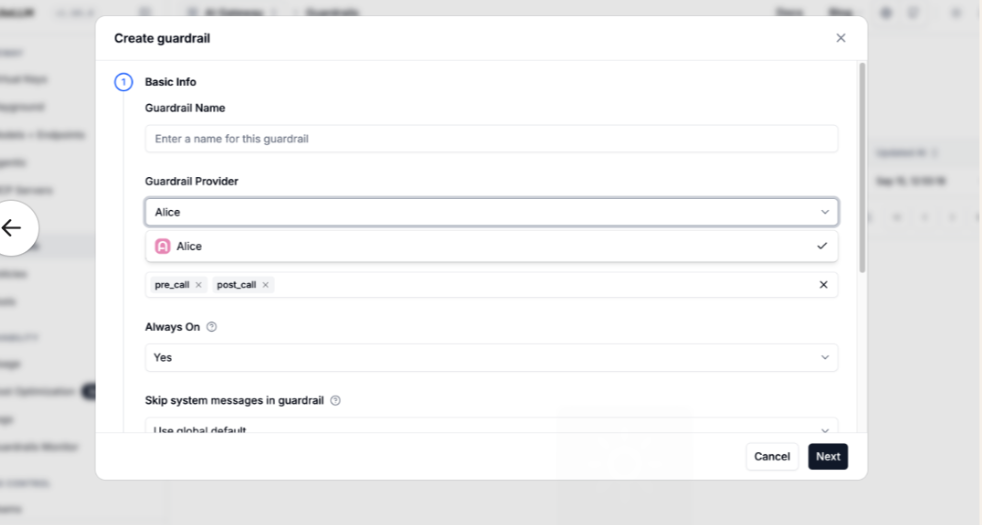
Open Guardrails, add Alice, choose your hook points, paste your API key and save. Nothing else needed.
Through your config file
If you keep your proxy configuration in version control, this does the same thing:
guardrails:
  - guardrail_name: alice
    litellm_params:
      guardrail: alice
      mode: [pre_call, post_call]
      default_on: true
      api_key: os.environ/ALICE_API_KEY
Either way the result is identical. The YAML is there if you want it, and the integration works fine without it.
What happens on every call
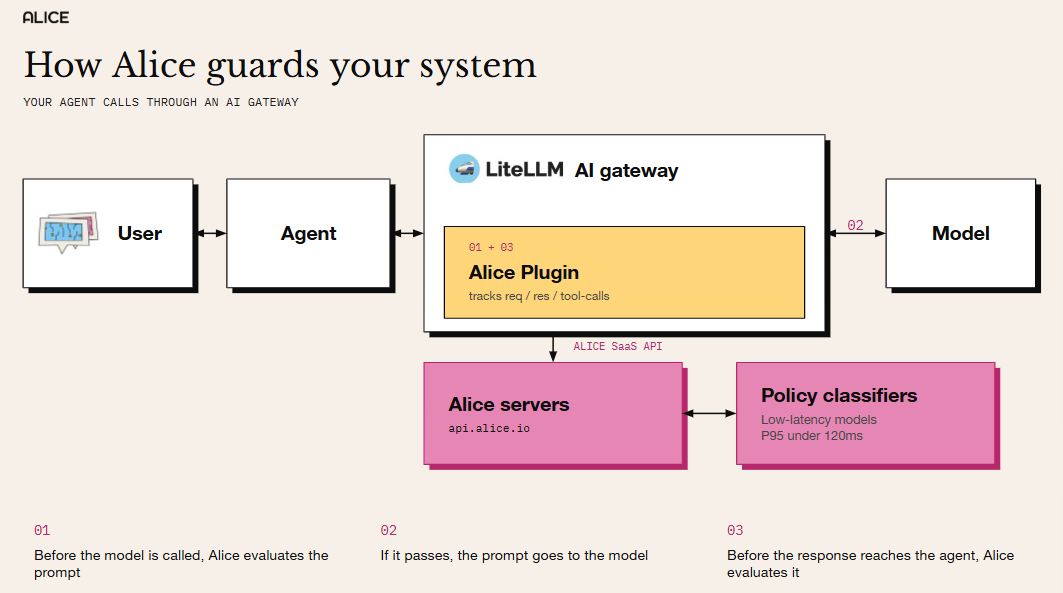
The guardrail passes the request to Alice, which checks it against your policies and sends back one of four verdicts. LiteLLM enforces whichever comes back.
- ALLOW: the call goes through.
- BLOCK: the caller gets a 400 carrying the block message you wrote on the policy.
- MASK: the sensitive part is redacted in place. If a replacement cannot be applied, the call is blocked instead, so half-masked content never reaches the model.
- DETECT: the call goes through and a warning is logged with a correlation id, so you can trace it back later.
Anything else, including a response that cannot be read, counts as an outage. The call does not proceed.
Tool calls too, as well as prompts and responses
Why the middle matters
A chat application is a prompt and a response. An agent is a prompt, a response, and a lot of activity in between: tool calls, the arguments passed to them, retrieved context, intermediate turns.
A guardrail that only reads the two ends sees the question and the answer while the consequential part happens unwatched in the middle. By the time a well-behaved final response comes back, an agent talked into calling the wrong tool with the wrong arguments has already done the damage.
What Alice does about it
- Tool call arguments are evaluated before they reach the tool.
- They run under the same policy set as the rest of the application.
- All four verdicts apply here, masking included.
If you are comparing guardrail providers, this is worth asking each of them directly. Most will tell you they cover prompts and responses. Fewer will tell you what happens to the tool call in between.
Guardrails on Claude Code
Point Claude Code at a LiteLLM proxy and everything it does becomes traffic you can govern, tool calls included. For a coding agent, the tool calls are most of what it does.
The policies are yours. Start from Alice's out-of-the-box set, then write your own around how your engineers actually work:
What the agent is allowed to reach.
- What must never leave your environment.
- Which actions warrant a hard block rather than a warning.
A coding agent with access to your repositories, your credentials and your shell needs a rule set built for that job. This is the same setup described above, so there is no separate product and no second integration.
One proxy, different policies per application
A customer support bot and an internal code assistant should not share a rule set. One is talking to the public, the other is talking to your engineers, and a policy strict enough for the first will get in the way of the second.
How it works
- Issue one LiteLLM virtual key per application.
- Name the application on it with alice_app_id in the key metadata, or just use the key alias.
- One project credential covers all of them.
Start from Alice's out-of-the-box policies, add your own where you need them, and apply the result as a baseline across every call passing through the gateway.
Why it holds up
A virtual key is the only thing on a request that the proxy itself authenticated. LiteLLM strips caller-supplied key fields before any guardrail sees the payload, so a developer cannot point their own traffic at an application with looser policies than the one their key was issued for. A request that names no application is refused.
What gets sent to Alice
The guardrail forwards the hook's own arguments without renaming or selecting anything, so Alice decides what is worth evaluating.
Credentials are the exception. These are dropped wherever they appear, at any nesting depth:
- secret_fields
- api_key
- raw_headers
- headers
- Provider_specific_header
The caller's authorization token lives in several of those, and a guardrail endpoint is no place to send it. The removal happens on a copy, so the rest of the pipeline still sees the original.
Getting started
- Create an API key in Alice under Account Settings, then API Keys, for the project whose policies you want enforced.
- Add Alice through the LiteLLM UI or your config.yaml.
- Issue a virtual key naming your application.
The full setup, including request and response examples, is in the Alice guardrails documentation on LiteLLM.
If you want to see what your own AI does under pressure before you decide what to enforce, book a demo and we will walk you through it.
How Alice guardrails screen live AI traffic.
Explore WonderFence →What’s new from Alice


LIVE from Black Hat Las Vegas: AI, Nation-States, and the Battlefield That Keeps Changing
What if the biggest threat to your security team isn't the attacker, it's the model you're relying on to stop them? LIVE from Black Hat Las Vegas, Mo and Madi bring together two cybersecurity authors, Caroline Wong, Chief Strategy Officer at Axari and author of The AI Cybersecurity Handbook, and Allie Mellen, Principal Analyst at Forrester and author of Code War, who wrote very different books that turn out to be arguing the same point. One explains why nations attack the way they do. The other explains why AI just changed the cost, speed, and scale of everything. Tune in!

Virtual Fireside Chat: The TAKE IT DOWN Act, Six Months In - What's Changed on Deepfakes and NCII
Six months after the TAKE IT DOWN Act took effect, the NCII landscape looks different and even more complicated. Join Alice for a live fireside chat with Google's Nidhi Lahoti on what's actually changed, what hasn't, and where T&S fit into it all - Join us live on October 9th, 2pm EST.

5 Ways Your Third-Party CX Agent Gets Broken
Third-party CX agents create hidden liability. Learn the 5 attack patterns vendors miss and how WonderSuite closes the gap.